Augmenting real demonstrations.
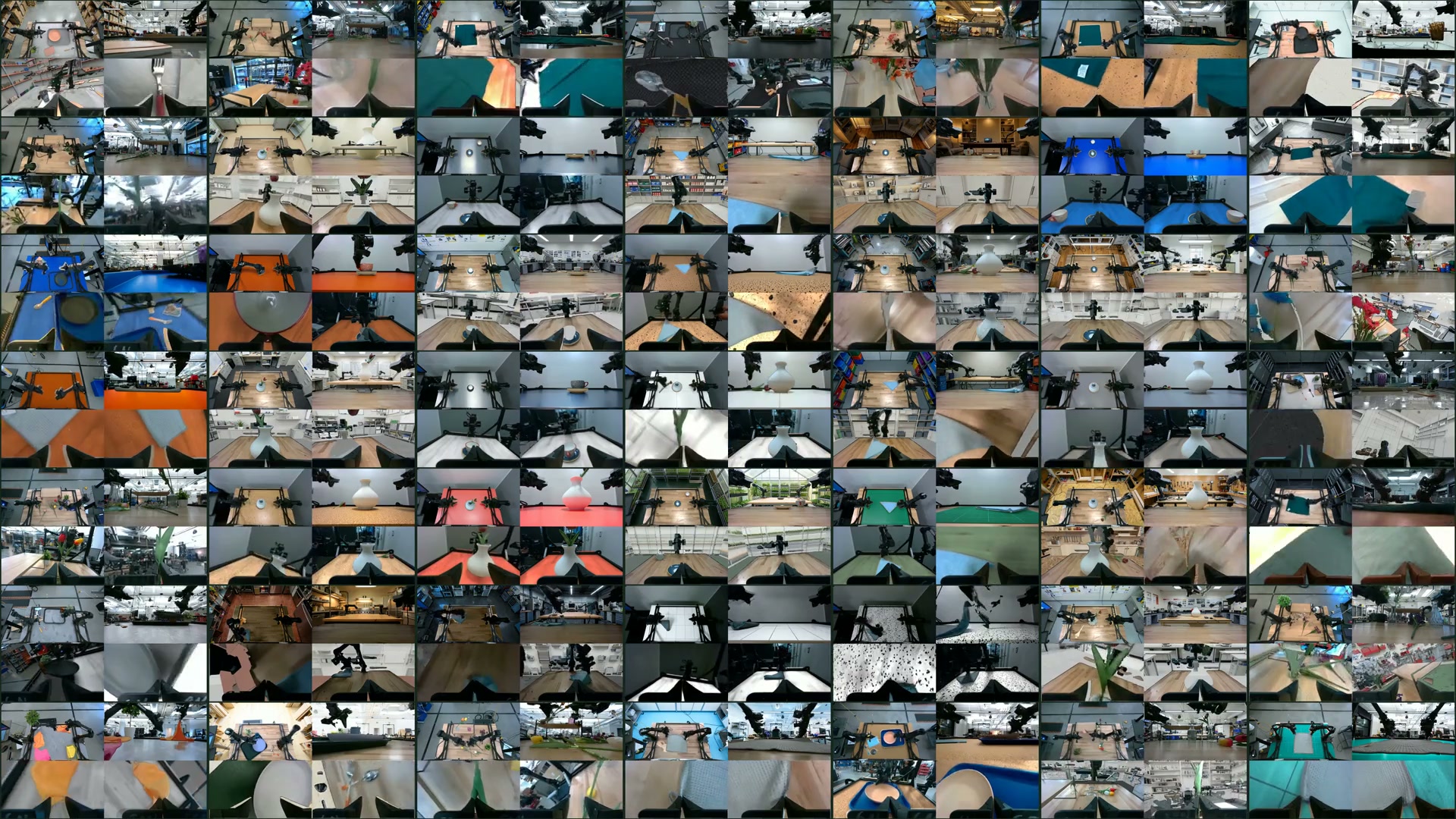
How does this work?
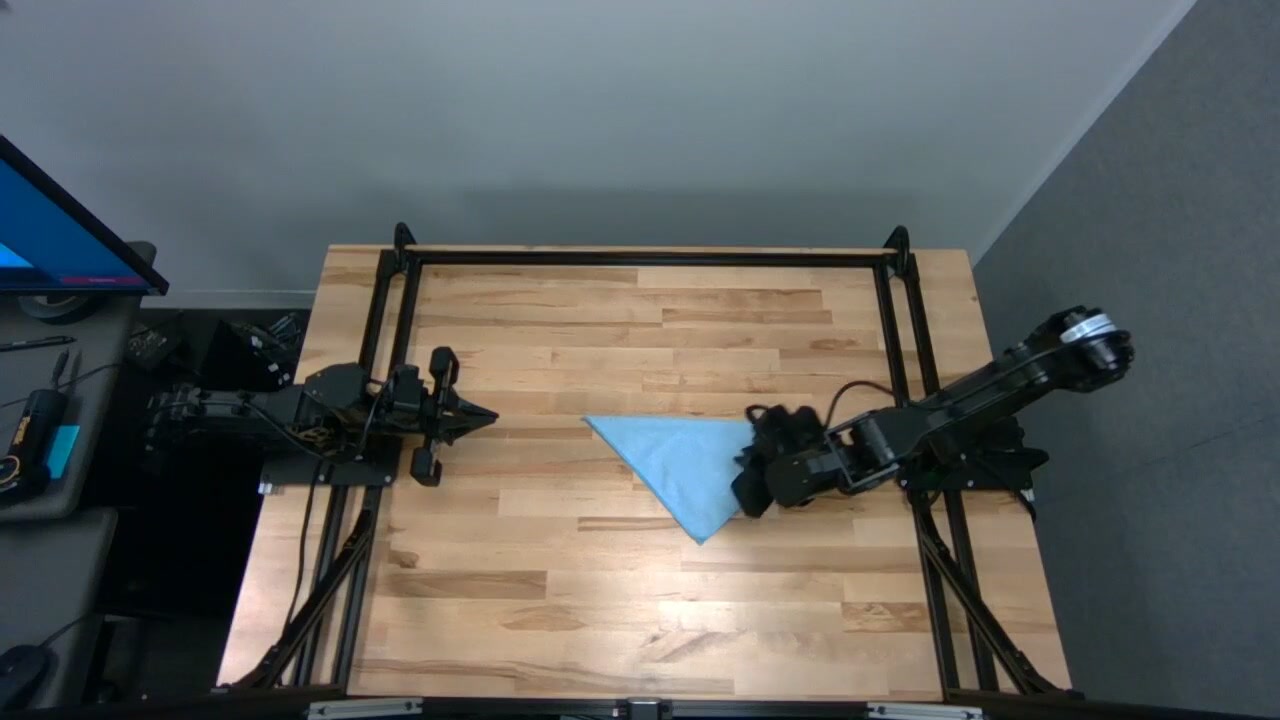
Before we can change the setting, we need to separate the robot and task objects from everything around them. We do that through segmentation, then augment the room or table surface and put the protected pixels back. This keeps the edited video aligned with the original instructions and actions. A towel-folding demonstration should still show the same fold, even if the room looks different.
Segmentation.
For towel folding, we need to find the towel and every part of the robot, including the grippers. Those pixels form masks that tell us where the original video should show through the edit.
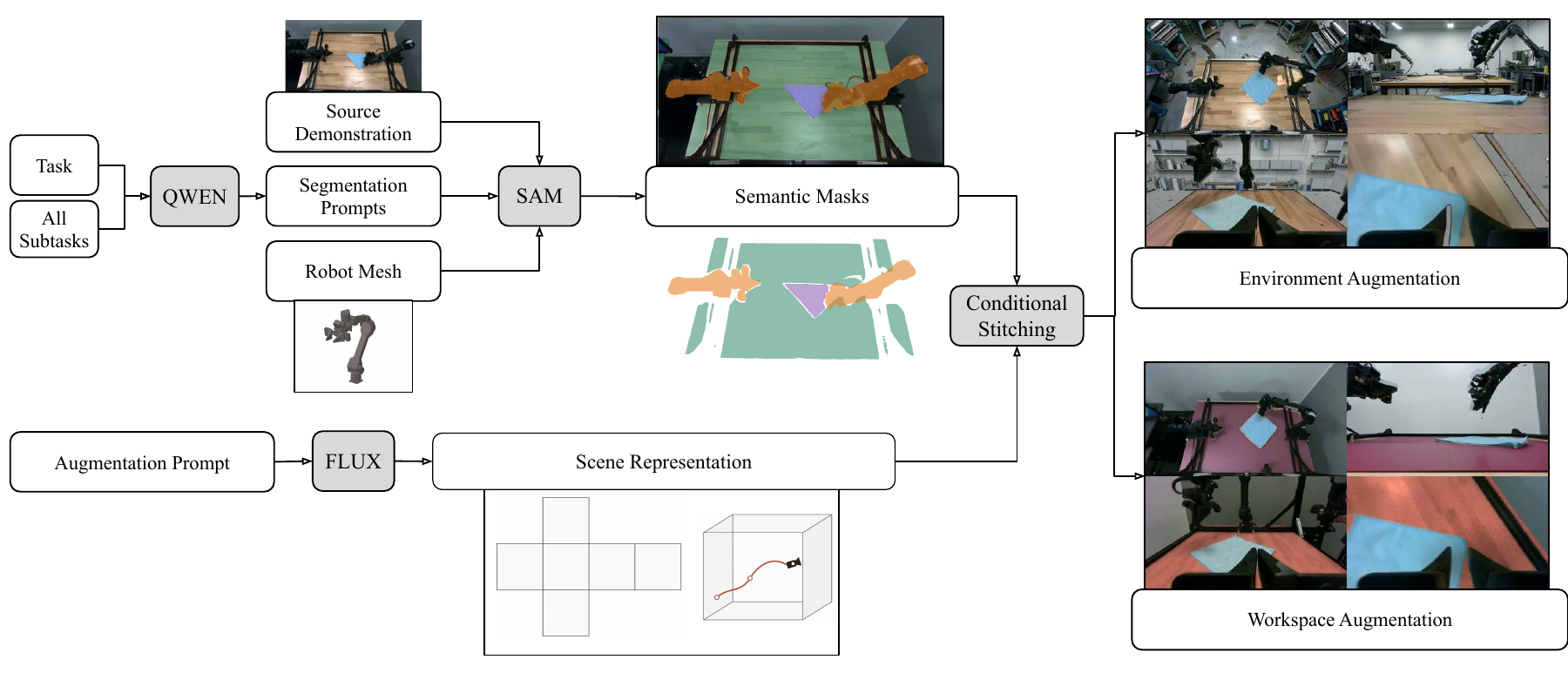
The recording already gives us the robot’s joint angles at each frame, so we can position its 3D model in the recorded pose. Projecting that model through each camera’s calibration tells us which pixels belong to the robot. For the towel and tabletop, we use the task instructions to prompt SAM 3, a segmentation model, to find them in the image.


Augmentation.
With those masks in hand, we can change the demonstration’s visual setting while keeping its instructions and actions valid. We could change the room, the tabletop, or the appearance of the objects the robot handles.
We focus on rooms and table surfaces because object edits need more reliable segmentation. When a gripper hides much of an object, or a wrist camera sees only part of it, finding its pixels consistently becomes harder. For now, we preserve the robot and task objects.
The natural first instinct is to edit each frame with an image model, or ask a video model for an edited clip. Prior work has used both approaches. We generate room or surface assets once, then render them from the recorded camera poses throughout the demonstration. Here’s how we do that for rooms and table surfaces.
Room augmentation.
The wrist views are harder because the cameras move with the arms. A wrist can look down at the table in one frame and up toward the ceiling a moment later. Editing each frame independently leaves the image model to invent backgrounds that agree across those changing angles and across both wrists, while keeping the gripper, object, and table intact.
I realized we could represent the room with just six images: a floor, a ceiling, and four walls. We generate those faces along with a static image of the working area, then reuse them for the whole recording. Since we know the wrist-camera poses from the robot state and calibration, we can render the room from wherever each wrist is looking. Each fixed camera reuses its own rendered background, so every view draws on the same generated scene.
In this example from the paper, all four cameras look into the generated room from their recorded poses.
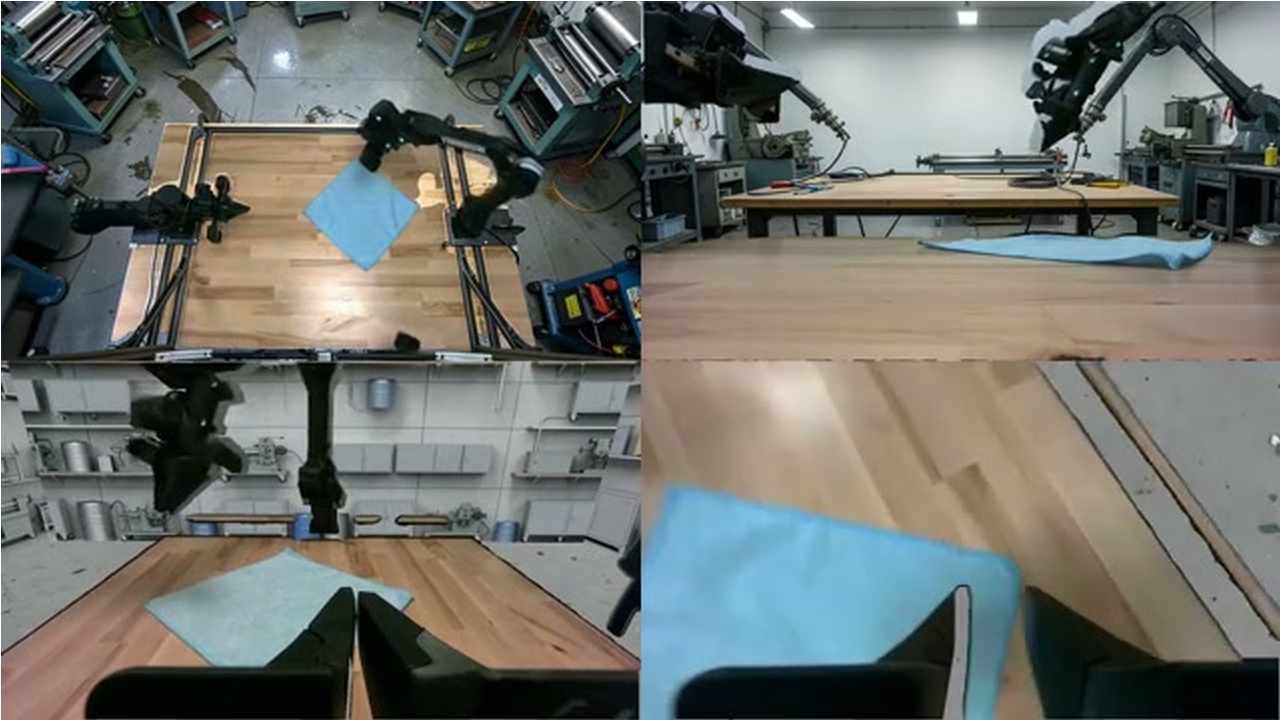 High fixedLow fixedLeft wristRight wrist
Surface augmentation.
For the table, we can use the same idea on one plane. We generate a surface texture once and project it onto the calibrated tabletop, so it stays in place as the wrist cameras move. The masks let us keep the towel and robot visible over the new texture.
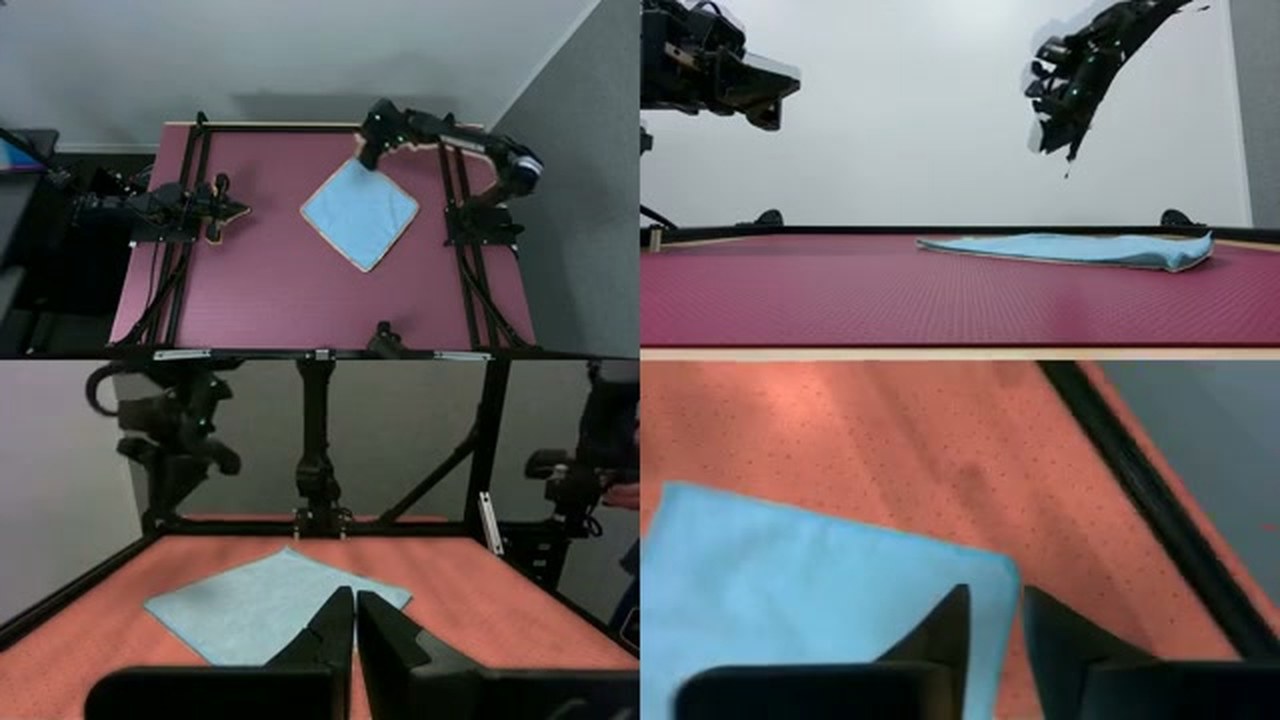 High fixedLow fixedLeft wristRight wrist
The full pipeline
Robot-mesh projections and SAM 3 segmentation identify the protected foreground. To recover the static scene, we exclude those pixels from sampled frames and take the median at each image location. This reference guides FLUX.2-klein-4B, which generates a working-area image and a six-image cubemap. We render these assets through the recorded camera poses and composite the original foreground over them.
Efficiency.
With the scene assets in hand, longer demonstrations mainly add rendering and compositing work. The same generated appearance serves all four cameras.
Keep the generated appearance for the full recording.
Render from the camera pose and restore the protected pixels.
Some segmentation work can be shared too. We reuse stable fixed-camera surface masks and estimate some masks by tiling four frames into one image. Wrist-camera objects still need a separate mask for each view and frame.
For the benchmark, we used 104 cup demonstrations totaling 30 minutes, with four camera streams on one node with eight H100s. The complete Augmentron pipeline took 0.47 hours. RoboEngine, a generative augmentation baseline, took 8.14 hours with the same data and hardware. That makes Augmentron about 17× faster in this benchmark.
Timing scope and Cosmos-Transfer1
The clock starts with cold model construction and stops after the local output audit. Queueing, container-image retrieval, credential and GPU gates, artifact staging, inter-boot delays, and publication fall outside this measurement.
A single-view Cosmos-Transfer1 run took 10.31 hours. Extrapolating its per-view stages gives 23.79 hours for four views. The paper reports that estimate separately from the measured runs.
Does the robot improve?
None of the above matters unless the robot improves.
Our dataset contains 1,793 real demonstrations, or 9.16 hours, across placing a cup on a saucer, folding a towel, and inserting a flower into a vase. For each task, we fine-tuned a separate policy from π0.5, a pretrained robot model. Augmentron processes all four camera streams; the policies see the high fixed view and both wrists.
The controlled experiment replaces half the training data with edits: 50% real demonstrations, 25% room edits, and 25% surface edits. Every source demonstration appears once. This keeps data volume and the 30,000-update training schedule matched to real-only training. We then test both policies in the original setup, with unrelated objects added, and with reflective steel covering the wooden surface.
Original setup
Where the data was collected
Added distractors
Same task, extra objects
Steel surface
Wood replaced with reflective steel
The largest pooled gain appears in the distractor test: success rises from 18.0% to 45.3%, or 27.3 percentage points. We didn’t explicitly insert distractors during augmentation. The room and surface edits appear to help the robot handle added clutter too.
Looking at individual tasks changes the picture. All three improve with distractors and on steel, but cup placement in the original setup falls from 86% to 72%. The pooled improvement hides that tradeoff.
The paper also tests recipes that keep the full real corpus and add augmented data. Their volumes differ, so the full results below need to be read with those differences in mind.
Task results and larger recipes
Same volume. Real only and Augmentron 50/50 use 1× data volume and the same 30k-update schedule. For 50/50, disjoint source-episode halves supply the real and edited data, keeping every demonstration represented once.
Larger recipes. At 45k updates, Augmentron uses 3× data volume, while RoboEngine and Masked Noise each use 2×. RoboEngine generates visual edits. Masked Noise applies static, pixelation, blur, blackout, or color jitter outside protected regions. These runs compare complete recipes; they leave the effects of data volume and individual pipeline components unresolved.
Exploratory checkpoint. The 30k Augmentron 33/67 checkpoint belongs to a run scheduled for 45k updates. It raises pooled distractor success from 45.3% to 50.7% relative to 50/50 at 30k, while success falls in the original setup and on steel. With both data volume and the decay schedule changed, this comparison cannot establish a scaling trend.
Cameras and trials. The pipeline processes two fixed and two wrist streams; policies observe the high fixed view and both wrists. Operators manually reset the starting configurations, which are unpaired across models. Rollout progress ranges from 0 to 3, and only 3 counts as success.
On a small screen, scroll the table sideways.
| Updates | Recipe | Volume | Task | Original | Distractors | Steel |
|---|
What two prototype trials look like.
The real-only policy makes partial progress. The policy trained with augmented data completes the task. The clips show the behavior from different manually reset starting configurations. For the full evaluation, look to the chart above.
Real onlyIncomplete, progress score 1 of 3
Real + augmentedComplete, progress score 3 of 3
Future research directions
The biggest next step for augmentation quality is better segmentation. A wrist camera may see a gripper and a flower stem, with the petals out of view. To edit the flower consistently, we need to keep track of which pixels belong to it. I’d start by fine-tuning a segmentation model on these robot views. Better masks would improve the current edits and make changes to the task objects themselves more feasible.